Retiring Baby Boomers lead to IT Workforce Crisis

ComputerWorld reports that the retirement of the Baby Boomers will lead to IT Workforce crisis. The tech crash shook a bunch of people out of the industry (mostly “HTML programmers” – the rodeo clowns of our profession), and it also caused a collapse in the number of undergraduates enrolling in IT courses (I’ve been doing my best to discourage anyone from entering the field).

Basic economics says that a reduced supply of workers and an increasing (or even static) demand for them leads to a rise in prices. And it’s not like prices are low at the moment anyways.

More champagne, anyone? I’ll just drive the shops in my diamond-encrusted Rolls Royce to fetch it.

I’m a tech luddite

I’ve come to realise I’ve become something of a tech luddite. Once upon a time I was an early adopter. Not any more.

I am only just now updating my computer monitors to LCD. (Samsung 19 inch 940N, very nice, very cheap.)

I didn’t start using Visual Studio.Net properly until it had matured to VS 2005.

I didn’t touch Windows XP at all until SP2 was well-established, and basic PC specs had caught up with its demanding requirements. And I’ve only just put it on my secondary PC.

Vista? Pah, unless I see something DAMN COMPELLING, I won’t be going there until at least 2009 I reckon. When the average PC has at least double the grunt specified on the box.

I refuse to get a wireless keyboard/mouse. I can’t see the cost benefit. Besides, given how messy my desks are, I’d inevitably lose them.

I’m getting my first camera phone shortly, having waited until the resolution and the price were up/down to a reasonable level. And it’s not 3G, but 2G. A tried and trusted Nokia.

And I’m not planning on upgrading my 4:3 CRT television any time soon. (As one recent review commented, they’re actually great value if you’re buying a TV.)

(I’m sure I’ll thing of more examples shortly. Like my stove/oven, made circa 1930.)

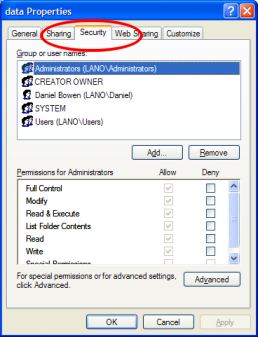
Where did my Security tab go?

Directory securityI’m thoroughly used to the security options on resources (files, directories) that has been around in Windows (XP, 2000, NT) for years.

So it completely threw me when it vanished from the new XP SP2 installation I set up on the secondary PC. I was trying to get Midtown Madness 2 working for non-Admin users, and couldn’t find anywhere a way of making its directory writable to everybody.

The Security properties would only show me some dumb-arse sharing options that related only to sharing across the network. I didn’t want to do that.

“Put the directory in the Shared Folders!” said the help. Uhh yeah, like that’s gonna happen. It’s in smegging C:\Program Files.

I checked the drive format. NTFS; should be fine. I checked it against my other PC, which was showing the security tab for every file system object. Why was this not appearing?

With Jeremy keen to play the game, but me not keen to let him loose on an Admin account (even for a few minutes; it’s not a habit we should be encouraging), I searched MS support. Nothing. I Googled.

Finally I found it… some obscure yet useless setting called “Simple sharing” was turned on. Default if you are in a workgroup, apparently.

Simple sharing is so useless it must be designed for Simpletons. And I can’t understand why the Windows Help and the MS support web site were unable to give me the solution — (at least, until I knew the magic words Simple sharing).

Bloody Microsoft.

Advertising in web addresses

Got a well-known brand? Why bother with consistency? Instead, change its name and/or web address for advertising purposes!

It’s not Yahoo Australia … it’s Yahoo!7

Just when you thought you’d got used to ticketmaster7.com, it’s changed back to ticketmaster.com.au

It’s not bigbrother.com.au, it’s bigbrother.3mobile.com.au

It’s not gmail.com, it’s gmail.google.com (just in case you forget what the G stands for)

Within domains it can be a mess too. Microsoft’s site always makes sure the default pages don’t end in / but instead in whatever their latest web server technology is. It used to be /default.asp, then /default.aspx, now it’s /default.mspx. It must be a nightmare of forwarding, to make sure anybody who has bookmarked in the past still gets to where they want. Go to www.microsoft.com/ie now, and it flickers past about 4 old addresses to get where it’s going.

Once upon a time, www.microsoft.com/windows/ie/default.aspx was the IE page. That one just produces an error now. Idiots.

iPod pricing

Have you noticed that iPod pricing is suspiciously consistent across retailers?

The Trade Practices Act prohibits price coercion, doesn’t it?

How are Apple getting around this?

I suspect that there’s next to no margin on the iPods themselves, but the accessories are high margin. So there’s no room to discount, but the profit comes from the impulse upsell. But this theory doesn’t make a huge amount of sense to me, unless Apple’s making their money on iTunes rather than the iPods.

Shut the window!

Jensen Harris remarks that many people still double-click on the top-left of a window to close it.

How do you most often close a window in Windows?

  • a. Double-click top-left
  • b. Click on the Close X, top-right
  • c. Use the menu via keyboard or mouse: File / Exit or Close
  • d. Alt-F4 (and Ctrl-F4 closes individual document windows — w00t!)
  • e. Alt-Space, then choose Close on the menu
  • f. Right-click on the taskbar, then Close
  • g. (Going to the extremes now) Open Task Manager, go to the Applications list and End Task
  • h. (Even more extreme) Task Manager / Processes / End process
  • i. I never shut any. I just fill the screen up with windows until it runs so slowly I have to reboot

Or some other way I haven’t thought of? Or some other way on another operating system?