(Work-safe)
You might have seen human Space Invaders:
Here’s a rather more chaotic human Pacman:

(Work-safe)
You might have seen human Space Invaders:
Here’s a rather more chaotic human Pacman:
Professional archivists agonise about how digital archives should be stored, but it’s important for those of us further down the food chain consider it too. Many people are simply burning their most prized data onto CD or DVD, and shoving the discs into the bookshelf. But given known doubts about the lifespan of burnt discs, how will you feel if they reach for them in 5 or 10 years and find them unreadable? (Just like I recently found many of my old BBC Micro disks unreadable.)
Pressed discs seem to be no problem. I’ve got CDs that are close to 20 years old that are still going strong. But recent warnings have highlighted that burnt CDs might only last a few years (even taking great care in handling and storage).
It’s been suggested that magnetic tape is the way to go in the longer term, with a view to periodically migrating to newer technologies as they come along. I’m still not sure I want to invest in a tape drive…
The other issue is formats. What format should be used to ensure that when you or your descendants poke around in your files, they’ll be readable? It’s not just a matter of choosing formats that are ubiquitous now, but also those that will be common into the future.
Think back 20 years. What formats were popular in 1986 that are still around now?
I think, for example, that of all the formats, JPEG and PNG (for pictures), MPEG-1 or 2 (movies), and MP3 (sounds) are perhaps the formats that have such open, widespread support that they’re likely to still be readable in 20 or 30 years’ time.
For text documents? What’s practical probably depends on your source files. Obviously TXT is totally human-readable, but lacking formatting. HTML (with support from JPEG and PNG) is probably the most obvious choice for many documents, as long as you don’t try and do anything too clever with it. RTF also has widespread support via open-source products such as OpenOffice, Mac OSX TextEdit and while it’s owned by Microsoft, is arguably as human-readable as HTML, and arguably an easier conversion for many existing documents such as those in Word format (though I’m not sure it supports all of Word’s latest features).
For other more specialised file formats, I suppose it depends what is the easiest format to keep them in… Definitely more thought required.
(Of course if there’s any doubt, printing on paper is the ultimate in future-proof technology!)
These days just about every computer is networked, and that means they have to have a hostname. So how do you name yours? Assuming there’s no particular corporate standard you have to follow, do you make up a theme, or just give them random names?
At home we have lano and woodley.
At my girlfriend’s place, they’ve called them crunchie and munchie.
The company I use for web hosting names their servers after towns and cities around Australia.
At one job I had, we went Red Dwarf, and ended up with holly (main server), kryten (test server) and hudzen (temporary server).
At another job, we started on The Simpsons, with maggie, marge, homer… then moved onto Asterix, with getafix (very appropriate for a machine that needed patching) and obelix.
Forget what I said a few weeks ago about creating your own certificates, at least for testing secure web services. You can do this from within Windows server; this KB article gives all the details.
There’s heaps more detail hidden away in this Word document… which probably would have come up in my Googling if MS would just put this information on a web page somewhere instead of as a Download.
Don’t have a Windows Server? Grab a trial download of one, and chuck it on one of those free Virtual Servers!
My favourite bug in Firefox (or at least the thing that irritates me the most), the cropping of long “Title” tooltips, one that I’ve written about before here, has just turned six years old, with one Bugzilla member sarcastically leaving a Happy Birthday message.
Hmm, a calendar of Australian IT women, in the name of encouraging more women into the industry. Available online at itgoddess.info.
If you’re more at home with mucking about on Virtual Machines, then you might be interested to know that Virtual PC is now free.
Billy Bragg has applauded MySpace for backing down on their T+Cs imposed on artists who used the site to distribute music. “I am very pleased to see that MySpace have changed their terms of agreement from a declaration of their rights into a declaration of our rights as artists, making it clear that, as creators, we retain ownership of our material.”
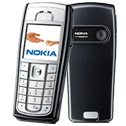 Like many people, I don’t just use my phone for making phone calls. It’s a calendar, address book, alarm clock…
In recently upgrading from my old reliable Nokia 6100 to a Nokia 6230i, I’ve added camera, radio and MP3 player to that.
(The 6100 still works fine. It’ll go into storage for when my kids start needing/wanting a mobile.)
Why the 6230i? In my position as tech luddite, I judged it to be a good balance of price (free, that is totally subisidied, on a $30 Telstra business plan, which has very decent call rates, in fact well below what I was previously paying) and features. I wasn’t willing to pay the premium for something super-fancy like the Nokia N-Series, which would have given me 3G. Video phone calls might be fun, but are pretty useless to me. Not worth the extra dosh.
It’s also (unlike some of the camera phones) not much bigger than the 6100, which is pretty titchy. If I’m going to carry a phone with me practically everywhere, it’d better be small. Err, but with a keyboard big enough for my manly adult fingers, and a screen big enough to be productive. Ah, conflicting requirements, but not insurmountable.
I should emphasise that I wasn’t looking for a phone to read emails on, or browse the web with. The 6230i will do both of these, but not well. How much can you fit onto a tiny screen? Not much. If you want to do that, I’d be looking at a proper PDA.
And yes, I wanted another Nokia phone. I know how they work. They’re easy to use, and I’d prefer not to wrestle with an unfamiliar OS. And those I’ve had have been fairly reliable.
It’s worth noting however that the first 6230i I got was faulty. Not in a major way, but the “1” key needed to be pressed quite hard to work. I took it back to the shop for another one.
Continue reading
Google now has world time. Just enter the location you want to know about, and “time”. (via Dan Warne)
Along with the calculator, metric/imperial and currency conversions, there’s a lot of handy stuff in Google now.
Apparently they even have web search.
Why did nobody tell me about this before? StaticIce — search Australian retailers/etailers for best prices on geek stuff.
AusPrices also does it, but at first glance seems to have less retailers in it.
Any others? (I know about DVDPlaza for DVDs.)
Those of us in AU who used to frequent Tandy Electronics might recall that they always asked for a name and address — ostensibly for customer service, but in practice to send you catalogues. I had a CompSci teacher in year 12 who refused to provide it; he found it ridiculous to do be asked, especially when buying something like a single resistor.
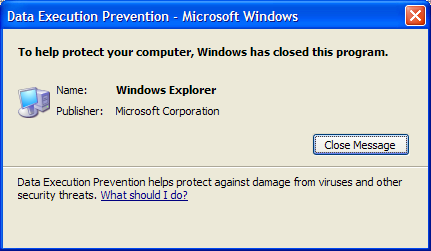
Raymond Chen writes about this happening at the affiliated Radio Shack stores in the USA, and tells a funny story refusing to give his name.
(Nice to know there’s no exceptions.)
I’ve come to realise I’ve become something of a tech luddite. Once upon a time I was an early adopter. Not any more.
I am only just now updating my computer monitors to LCD. (Samsung 19 inch 940N, very nice, very cheap.)
I didn’t start using Visual Studio.Net properly until it had matured to VS 2005.
I didn’t touch Windows XP at all until SP2 was well-established, and basic PC specs had caught up with its demanding requirements. And I’ve only just put it on my secondary PC.
Vista? Pah, unless I see something DAMN COMPELLING, I won’t be going there until at least 2009 I reckon. When the average PC has at least double the grunt specified on the box.
I refuse to get a wireless keyboard/mouse. I can’t see the cost benefit. Besides, given how messy my desks are, I’d inevitably lose them.
I’m getting my first camera phone shortly, having waited until the resolution and the price were up/down to a reasonable level. And it’s not 3G, but 2G. A tried and trusted Nokia.
And I’m not planning on upgrading my 4:3 CRT television any time soon. (As one recent review commented, they’re actually great value if you’re buying a TV.)
(I’m sure I’ll thing of more examples shortly. Like my stove/oven, made circa 1930.)