Geek Rant dot org


Thu 2006-09-21

Basic Windows setup

Filed under: — daniel @ 07:05

I got a “new” secondhand PC for my girlfriend. An off-cast from a friend, so obviously it’s not the latest and greatest, but it’s faster than the box she has now. 500Mhz P3, 192Mb, about 40Gb space over two hard drives. Might see if I can find some more memory for it, but I can live with that. It was running Win98 SE, and was overdue for a rebuild.

Wordprocessing and web were the main requirements. An old computer and basic requirements call for basic software, and old versions in some cases.

So, here’s the setup I did on it:

Found a spare Win2K licence, booted up using the CD and wiped the disks. Installed.

It picked up all the hardware no problems, but later I found it didn’t shut down automatically (went to “It is safe” instead). Made a note to fix that later.

Installed Win2K SP4 and the post-SP4 rollup (aka SP4 and a half). And IE6 SP1.

Then went to Windows Update and got it to grab everything going; well, at least the security stuff — don’t really want the latest bloated MediaPlayer. 45 updates and many minutes later, it was okay. Except for one thing, which I came back to later.

Found a spare Office licence (XP) and installed Word, Powerpoint and Excel. She’s not a geek, so she didn’t need Access or Frontpage, and her email is all web-based, so I didn’t bother with Outlook. Went through the custom setup to ensure minimum bloat (eg no VBA help, obscure file conversion, speech input, that kind of thing).

Put on Office XP SP3, then went to Office Update to see what was going. Stupid thing wanted to install patches for Visio. Switched them off.

Grabbed the typical extras useful for web browsing: Acrobat Reader 5.05 (just before they went stupid with bloat; still obtainable from oldversion.com). Flash Player (latest). Quicktime Alternative. Real Alternative. And Google Toolbar for popup blocking.

Also plonked on the latest DirectX. Winzip. AVG Free. This PC will live behind a NAT router/firewall, so I’m not going to bother with a firewall.

Put a copy of Mame32 on there for some light entertainment.

Created a logon for her, and a logon for me. Standard users of course; not Admin. Verified everything works under those new users.

Used Ed Bott’s method for securing IE: Once the ActiveX controls you want are in place, go into the security settings and disable Active X Signed downloads. You have to do this for each individual user, but it solves a major gripe of mine; that IE can install any old crap provided it’s signed.

Went through the services and disabled the extraneous stuff, like Messenger. Likewise checked for any other little applets that decided they should run in the background. Most of them aren’t needed.

Turned on automatic Windows updates. One problem: it insisted one patch needed installing, but each time it claimed it had worked, it hadn’t. Next time it looked, it still needed to be installed. Downloading and running the patch manually showed it had been superseded by something else… but Windows Update apparently couldn’t figure that out. Eventually I solved it by going into the Windows Updates web site and manually telling it to ignore this patch. (Thanks Malcolm for the help on this.)

As for the “Safe to turn off” instead of turning itself off, that was solved by going into the Control Panel power options and turning on APM.

Am considering Paint.Net, but then I’d have to put the Dot Net Framework on it as well. Don’t want to over-burden the poor box.

Ditto Firefox — IE has the advantage of virtually sitting in memory most of the time. Firefox is great on fast machines, but is an extra load on slow ones — as I write this, Firefox on my PC is sitting on more than 70Mb of memory. Sure, I could get Opera or whatever, but if IE is relatively safe (patched, unable to download more ActiveX, most popups blocked, running under non-Admin users, and not being used by idiots), why bother?

Considering adding Java (my Internet banking needed it until very recently, but they just switched to pure HTML, woo hoo!) and DivX.

Anything else I’ve missed before I hand it over? Will it be secure enough?

Digg this

Fri 2006-05-12

Old PC getting you down?

Filed under: — daniel @ 17:44

It’s been long known that outdated computer equipment could have direct consequences for productivity, by slowing the workers down to the speed of their machinery. But a new survey concludes that it also has effects on morale in offices, causing not just unhappiness, but also more issues with things like eye fatigue, headaches and RSI.

(Hey boss, can I have a new PC?)

Digg this

Mon 2006-04-03

PC Screws

Filed under: — josh @ 11:49

While I’ve noticed there are a number of screw sizes, I never realised that
Hard drive mounting screws are different to Optical drive mounting screws. BTW, there are two threads in computer construction - imperial and metric.

Digg this

Mon 2006-03-20

Windows for Mac

Filed under: — daniel @ 22:27

They’ve done it: Windows XP is now bootable on an Intel Mac.

Digg this

Wed 2005-05-18

Prank

Filed under: — josh @ 16:45

So, that shiny new computer I’ve been given and my propensity to save power have combined with boyish enthusiasm with a practical joke to create a very embarrassing situation for the two other contractors I work with.

I normally leave my box locked overnight, shutting it down on a weekend. So a discovery of a week ago had to wait until Monday to play out.

My new computer has a temperature sensitive main case fan that’s ducted - at higher temperatures the fan is cranked up to increase the airflow over the water cooled CPU heatsink. There’s a BIOS setting to set the idle fan speed; the default value is almost imperceptable, the highest is a roaring not dissimilar to a jet taking off (mainly because of the ducting and air being forced through the heatsink - all the turbulance is very noisy) and certainly seems to move a lot of air. Apparently the other guys here discovered this setting, and thought it would be a great idea to crank up the idle fan speed to “stupidly high” while I was away.

When I powered up the box, and the roaring fan started, I immediately went to Dean, the guy who did the swap-over to the new box. Having a CPU cut out because of overheating is not cool; I imagined that the heatsink might have come off somehow. He couldn’t imagine what was going on, and did note that the air wasn’t hot. Opening it up revealled everything in its place.

At this point the pranksters saw that this could escalate well beyond a prank and intervened with an explanation. Whilst I wasn’t put out, other people put the pranksters in their place. So, kids, be careful with those pranks. They could blowback on you (oh, I hadn’t intended that pun!).

Digg this

Fri 2005-05-13

Ten years ago…

Filed under: — daniel @ 07:28

Yesterday, I bought a computer. With a bit of luck it’ll be ready on Saturday.

As it happens, it’s not quite ten years since I bought my first “new” PC. (Before that I’d used 8-bit computers and an aging 286.)

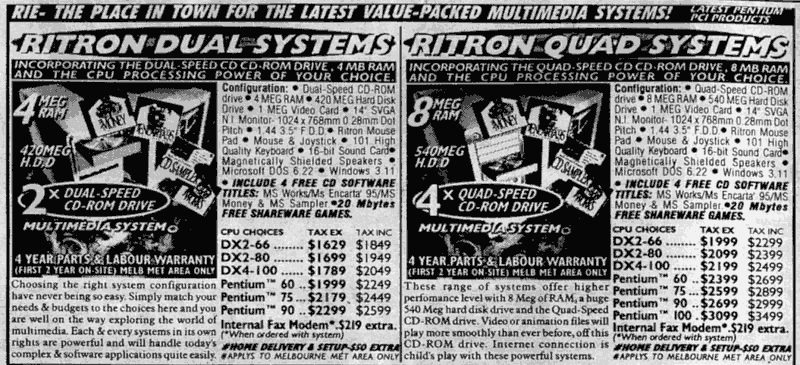
Just for a little nostalgia, here is part of the advert from the company I bought it from all those years ago, the now defunct Rod Irving Electronics, of A’Beckett Street in Melbourne. This is from the 6th June 1995 edition of The Age “Green Guide”.

The system I bought from them was the Pentium 60 on the right hand side. I’m sure you’ll be impressed at the spec, as well as the marketing. (At the time, the Australian Peso was worth about USD0.60, by the way).

Rod Irving Electronics catalogue from 1995

This computer was finally disposed of in rather spectacular fashion in 2003, though the speakers and that mighty 4x CD player still work (currently stored as spares).

Digg this

Mon 2005-05-09

Soundcard problem fixed

Filed under: — josh @ 17:04

Remember my noisy soundcard at work?

Well, the problem has been fixed - by getting a new computer. Naturally, it wasn’t the only reason for an upgrade, but it was the main reason. ;-)

But that’s not the impressive thing; the impressive thing has been the upgrade process. It was the smoothest I’ve ever experienced. Old parallel IDE drive out, plugged into new SATA computer’s CD ROM cable; boot OS, copy a couple of directories over, shutdown computer; remove old parallel IDE drive, reassemble box; boot OS, work. And that was it. Must have taken 15 minutes tops - I was expecting two days of downtime or lowered productivity. Every piece of software I need was installed and ready to go, I only had to tweak a couple of preferences. Similar process for all the other upgrades the team has undertaken this week.

So, my opinion of Dean, the guy that organised it all, has gone through the roof. Dean rules. He rocks.

And all because he arranged to not waste my time. What a guy.

Digg this

Mon 2005-04-04

Little Dreams Coming True

Filed under: — tony @ 19:59

At last, one of my longest standing tech dreams has been realised. I can finally sync my phone with Outlook. I know you’ve been able to do this for years but up until today I’ve never had the means to. Two weeks ago I got a great new Nokia 6230 so I purchased a connector cable off Ebay which arrived today. I could have used Bluetooth for my connection but this chews through battery life (more of which shortly) and a cable was cheaper than an IR usb adaptor. Now I have all my contacts and calendar information for the next 12 months wherever I go.

“But surely you had all this in your Ipaq?” I hear you ask. I did, but in an effor to simplify my life and reduce the bulge in my left pocket I am increasingly leaving it home in favour of my Hipster PDA. Another reason for relying less on the iPaq is the Pocket PC version of Microsoft Money never really synched with my desktop version and tracking finances on the go was one of the major reasons I wanted a PDA. Now I simply keep my receipts in my wallet until I get home.

While I love my new phone, I’ve even set it up so I can email photos from it direct to Flickr (see my test shot), I am not impressed with the battery. It advertises 300 hours of standby - I get 48. I’ve tried to get it replaced but am having nightmare time as Optus and Nokia shuffle responsibility. All I want is a new battery and they will never hear from me again.

Digg this

Sat 2005-03-26

Josh’s freaky Compaq PC

Filed under: — josh @ 09:29

I’m using a Compaq D5S/P1.7/20j/p/128c/6 AUST

I’m getting whitenoise in the soundcard at work. It’s there all the
time, but drowned out by music. It stops when I have the left mouse button
depressed to select cells in Excel, but releasing it resumes the whitenoise.
Clicking on or selecting stuff outside of Excel doesn’t affect it. Outlook
selections don’t stop it, but selecting stuff in Word stops the whitenoise -
but again, only while the mouse button is held down. Another thing to stop
the whitenoise is dragging splitter bars around in Visual Studio 6. So it’s
not the mouse per se. And just recently, these “fixes” have stopped
working. Stopping a particularly long build restored the fix. Popping up
task manager shows that it seems that the white noise goes away when the CPU
goes to 100%, unless there’s disk activity. Got any suggestions how I can
fix this? And, preemptively, I don’t intend to load the CPU at 100%
permanently for my listening pleasure.

Digg this

Mon 2005-01-17

Lego PC cases

Filed under: — daniel @ 08:08

Oh, very cool. PC cases made of Lego.

(via Fan-Fugu-Tastic).

Digg this

33 queries. 0.455 seconds. Powered by WordPress