Geek Rant dot org


Sun 2007-03-18

CSS for table displays

Filed under: — daniel @ 10:33

After much time swearing over how to get a table-like display out of CSS, I was stumped. All I wanted was an definition with the label on the left hand side and the text on the right, wrapped into a column.

And let me tell you: given my limited knowledge of it, wrestling with CSS is not my idea of fun.

Finally after scouring Google for various terms, I did a search for “hanging indents” which led me to a good way to do it using dd dt and dl tags, and appropriate CSS for each. Eureka! (Yes, if I’d thought about it, these tags are for “definitions”, precisely what I was trying to do.)

Thank you, the good people at Max Design.

Digg this

Thu 2006-07-20

Toys “R” Stupid

Filed under: — josh @ 05:02

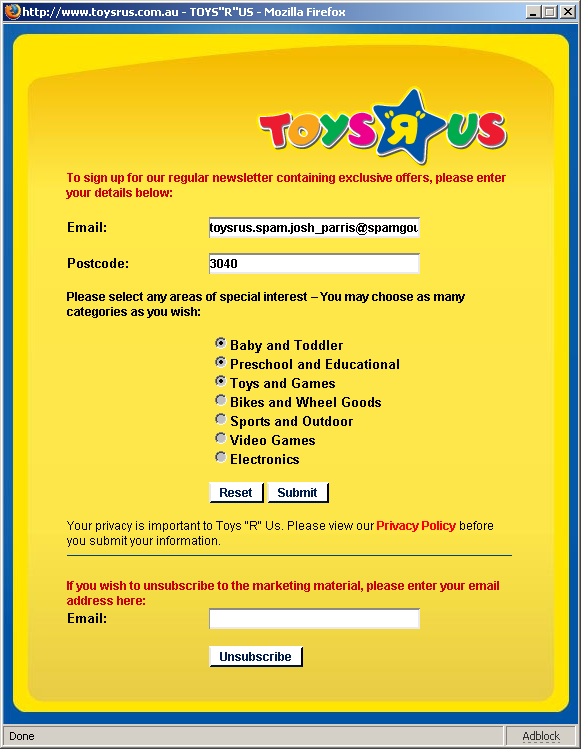
Want to see some HTML Form stupidity? Go to http://www.toysrus.com.au/site/signUp.htm and you get:

The stupidist HTML form I've seen in a while

Radio buttons - users know what to expect from them. You can pick only one option. Not these puppies. These happen to be round checkboxes - that you can only turn on. You can’t turn them off! Oh, sure, there’s a “reset” button down the bottom of the form, but can you recall the last time you pressed the “reset” button on a form? I don’t think, in my many many years using the ‘net, I ever have. Not once. I have “reset button blindness”, and I imagine a bunch of others do too.

To top this off, because the site is mainly Flash, figuring out what the address of the page took a while. In the end I had to bookmark it to find it.

I guess that’s what happens when you get schoolchildren to build your website.

Digg this

Tue 2006-05-02

Where are the aliens?

Coffee drinkers are easier to persuade.

Fermi’s Paradox is explained by aliens getting adicited to computer gaming.

Strom reckons he knows how to make money with a website: ads! Plus a little other stuff.

An Irishman has a rather good summery of how to negotiate an intial salary.

Cross-platform rounded corners without images, extra markup nor CSS. The holy grail of web-design dweebs.

Digg this

Fri 2006-03-24

Hassles with background-image and font sizes

Filed under: — daniel @ 07:13

The other day I was working on upgrading the eVision web site to the new look (as well as the latest Wordpress 2.02). While I’ve been using HTML for more than a decade, I have to admit, my grasp on CSS is patchy. I’m still picking it up. So it took a bit of wrestling to get it to (more or less) match the design provided by the graphic designer. The big graphic still isn’t in quite the right spot, but no matter, it’s still a vast improvement over the old one.

I did learn a couple of (possibly) valuable tips:

  • In Firefox, the background-image of a div doesn’t display in the portion of the div that has nothing in it. In my case, I had a UL (which forms the dropdown menu) in there, right justified. The background only appeared in the left hand bit in IE, not Firefox. I had to add a   to it to get it to appear… and then I had to specify a height, so the background image would go to the right height, instead of just the nominal height of the non-existent text.
  • Font sizes… after complaints from a colleague who is keen on big text, I had to remove all the references to pt sizes in text, in favour of em, so that IE would resize the text when asked. Firefox handles this even if you’ve got all pt sizes.
  • I also learnt I need to study CSS a bit more. The next projects will be doing some more upgrades and new Wordpress themes, I think. I’ve got a few that need doing.
Digg this

Sun 2005-11-06

NVU

Filed under: — daniel @ 21:37

I’ve been playing around with the NVU web page editor, an open source application available for Windows, Mac and Linux. So far it’s good stuff, certainly rivalling Frontpage, and heaps better for new users looking for something cheap or free other than MS Word (which has well-known problems).

Now up to version 1.0, it probably isn’t on a par with Dreamweaver, but for basic WYSIWYG web page editing, definitely worth a look.

Digg this

Mon 2005-10-03

Office’s garbled HTML

Filed under: — daniel @ 18:01

Brian Jones on why Microsoft Office 2000 (and later) produces such godawful HTML:

Our scenario was that people would start saving “docs” as HTML on their intranet sites and browse them with the browser. We viewed the browser as “electronic paper” that we had to “print” to (i.e. perfect fidelity). We had already got a lot of feedback from our Word97 Internet Assistant add-in that any loss of fidelity when saving as a web page was unacceptable and a “bug”. As it turned out, this usage scenario did not become as common as we thought it would and a zillion conspiracy theories formed about why we “really” did it. Many people assumed that a better approach would have been to save as “clean” HTML even if the result did not look exactly like what the user saw on the screen. We felt that the core office applications (other than FrontPage) were not really meant to be web page authoring tools, so we focused on converting docs to exact replicas in HTML. We didn’t want people losing any functionality when saving to HTML so we had to figure out a way to store everything that could have existed in a binary document as HTML. We thought we were clever creating a bunch of “mso-” css properties that allowed us to roundtrip everything. HTML didn’t take off in the same way we had expected, and today, the main use for Office HTML is for interoperability on the clipboard, though of course the biggest use is within e-mail (WordMail).

None of this explains why Office 2003’s “Filtered HTML” is so riddled with proprietary tags, though. Admittedly, a filtered HTML file is smaller than a roundtrip HTML file out of Word, but it’s still hugely bigger than the type of HTML you’d write from scratch (or in a web page editor such as Dreamweaver or Frontpage), and the source code is unreadable.

To my mind, Filtered HTML should be just that: HTML, filtered in such a way that the basic structure of the document is preserved, but none of the junk that Word (or whatever) stores along with it. Leave that for the roundtrip HTML — though I can’t see the appeal in that either, since if you want to store documents in a viewable form on the great InterWeb, PDF is the way to go. Or just store it in the native Office format for internal use, when you know every user will have the application or a viewer.

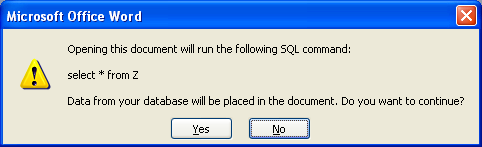
Word warning(By the way, when I was trying out the roundtrip HTML the other day, while reloading, Word presented me with a strange warning that it was going to query from some nonsense “Z” table to put data in the document. Bizarro. The test document did quote some SQL, but this would seem to suggest the roundtrip HTML isn’t all it’s cracked up to be.)

Anyway, Brian’s full article is about the progression of the Office formats from binary in the 90s into the XML to be used in the next version. Well worth a read if you want some background on the history, and where they’re going now.

Digg this

Mon 2005-07-25

Cleaning up HTML out of Office

Filed under: — daniel @ 21:19

I found a good guide to cleaning out the gunk that’s in Word’s HTML documents. For the smallest most efficient files it seems to conclude that the Textism Wordcleaner — free for files under 20Kb; for bigger files subscription options are available. This issue has been causing me some angst for some time, and one of these days I’m going to bash out a tool for this myself. (Don’t hold your breath.)

Digg this

Fri 2005-01-21

CSS rocks, design can suck

Filed under: — josh @ 13:35

I love what CSS can do, the power it gives you to make a pretty page and the power to change that without changing the underlying page. Zen Garden changed my understanding of what could be done.

Then, I saw this CSS horror, and I truly understood the power.

Digg this

Fri 2004-10-22

Excel to HTML

Filed under: — daniel @ 07:18

I can’t believe how stupid Excel (2002/XP) was with the table of browsers the other day.

The plan was to get the numbers into Excel, copy/paste into a Frontpage table to strip back the formatting, then paste into WordPress.

Nup, bloody monstrous Excel tags right the way through it, which Frontpage couldn’t override, and evidently no easy way to strip. No combination of Paste Special would work. So for example, instead of <td></td> we got:

<td align="right" x:num="1.15E-2" style="color: windowtext; font-size: 10.0pt; font-weight: 400; font-style: normal; text-decoration: none; font-family: Arial; text-align: general; vertical-align: bottom; white-space: nowrap; border: medium none; padding-left: 1px; padding-right: 1px; padding-top: 1px"></td>

I kid you not. Now, I know about round-trip HTML, though I have my doubts that anybody uses it — firstly because it looks like crap in a web browser, and secondly because if you’ll want to edit it later, you’ll just keep an XLS copy. Besides, it’s badly implemented. The cell above was using the “Normal” style. It shouldn’t have had all the formatting crap embedded in it.

Word XP actually has a Save As Filtered HTML option to strip out all this crap. Excel XP doesn’t. (I haven’t checked Excel 2003 yet).

Plan 2 was to save it as HTML, load it into FrontPage and crop the HTML to paste into WordPress. Nup, trying to re-open it in FrontPage just threw it back to Excel. WTF?! Opening in UltraEdit (my preferred text editor) just revealed the same tags as above.

How can two Microsoft products that are part of the same suite, same version, operate so disastrously badly with one another, for something as simple as copying a table?

Plan 3? Oh bugger it, it’s only a few lines, just write it by hand.

If it were more I’d go install and run that clear The Useless Crap Out Of The HTML filter thing (oh look, they could do with clearing the crap out of their URLs too), but it refuses to install unless you have Office 2000. Wonderful.

Next time (after swearing a bit) I’ll probably save to CSV and then do a global replace from commas to table tags.

Surely there must be an easier way?

Digg this

Tue 2004-10-05

Sitepoint Anomaly

Filed under: — tony @ 20:27

I’ve been meaning to buy a couple of books from sitepoint for a while now. I’ve borrowed a copy of their HTML Utopia: Designing Without Tables Using CSS, a fantastic guide to CSS and their Build Your Own Database Driven Website Using PHP & MySQL looks great so when they emailed me an offer of 20% off this book I thought why not.

That is until I saw the site. Ifyou spend over USD$70 (effectively two books) you get free postage anywhere in the world. Hmmm. Take the offer and save $7 off one book or reject the offer (which takes me below $70), pay full price and save $15?

Regardless, they’re great books.

Digg this

34 queries. 0.764 seconds. Powered by WordPress