
Author Archives: daniel

Setting up a used Mac Pro

Mac ProWe’ve got a used Mac coming to our house. I haven’t owned a Mac before (though I have used one a bit).

It’s a 2008 era Mac Pro, bought through my sister’s work, and the I’m told the spec is:

MacPro3,1 – 2 x Xeon 2.8 GHz (8 Core), 4GB Memory, 300GB Storage, OS 10.6

So despite being 4 years old, should be pretty quick I reckon.

It’s coming without keyboard and mouse, so I’ve gone and bought a cheap Microsoft Desktop 600 pack (corded USB keyboard and mouse) because I discovered I had not a single USB keyboard in the house. (I have an intense dislike of the feel of Apple the keyboard and mouse.)

My plan is to upgrade it to the latest OSX (A$20.99 on the Mac App Store; and Harvey Norman has a special of 2 x $20 iTunes cards for A$30 at the moment), install a new big hard drive (I’m thinking 2 terabytes — it looks like the Western Digital Caviar Blacks should be compatible with it, and cost about A$190) and use Boot Camp to get Windows 7 running on it alongside OSX.

Some more memory would be good, too.

Standby for updates and desperate pleas for advice as we figure it out and set it up.

First question – can I sign up for the Mac App store without messing up my iTunes account on another computer?

A friend on Twitter says it’s fine — it would fall into the usual 5 devices per iTunes account thing.

Video connection

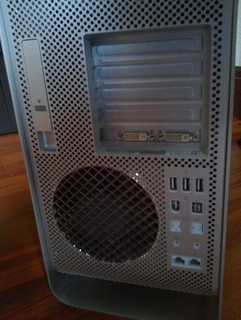
I didn’t even think of this. Only DVI connections out of this beast — my old monitors are all VGA.

It’s Sunday afternoon, so my options for an adapter were Officeworks ($30) or Dick Smith ($25). Dick Smith wins.

The beast fires up
The long wait to create my Mac accountThe beast fired up and asked for my initial account information… then sat there for about 15 minutes “Connecting to Apple”. Eventually it got there.

It’s got OSX 10.6 on it… went to run Software Update, but it had a problem with the download (possible corruption) and decided it wanted to have another go. Odd.

Updating OSX

Had to update to 10.6.8 to get the Mac App Store, then with $2.25 left on my iTunes account from previously and a $20 iTunes card added, I’ve bought Mountain Lion (10.8). Almost 2 hours to download it, mind you… this had better be worth it.

It was only after buying and starting to download that I read an interesting article suggesting that actually Snow Leopard (10.6) is the ultimate in stable useable OSX versions for older Macs. D’oh. Oh well. (Some interesting other stuff on lowendmac.com as well.

After installing 10.8, I’m rather impressed that all but 10Gb still appears to be available on the disk. Very impressive. Actually it hasn’t installed… now it says it’s still downloading. Will investigate.

Slightly disappointed though that GarageBand and iMovie aren’t free anymore. $15.99 each on iTunes, won’t break the bank (especially if bought with discounted iTunes cards).

OSX 10.8 take 2
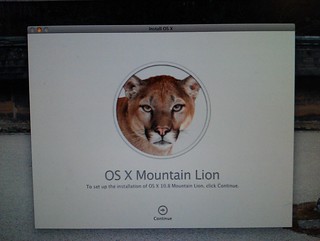
Upgrading OSX to Mountain LionOK, now it’s installed. Took a little longer than expected, but it’s very nice. Will take a little getting used to, of course. Seems quite responsive.

Startup chime

The startup chime is stupidly loud. I’ve “fixed” it by muting the internal speaker — since generally we’ll use this beast with external speakers, so having the internal one silent won’t be any loss.

There are software solutions to this, but many of them don’t work in OSX after 10.6. Apparently this one: StartNinja, should work.

Windows: Bootcamp vs Parallels

I’d intended using Bootcamp to run Windows 7, but it was suggested to me that I should check out Parallels (or VM Fusion, in Chris’s awesome set of tips below).

This article compares Parallels and Bootcamp(taking into account that Parallels has recently had a big upgrade in performance, though just in the last week or two there’s been another new version). This probably sums it up: “while Parallels is an incredible technical achievement, the Windows power user will notice a drop in performance.”

The article goes on to say that basically it depends on whether you’re primarily going to use Windows (in which case go Bootcamp) or you genuinely want to use them side-by-side (in which case Parallels may be the go).

This article compares VM Fusion and Parallels, and concludes that the former is slightly better, but it depends on your priorities.

Anti-virus

Some diehard Mac users say they don’t need anti-virus. I’m not so sure — while it seems unlikely, there are some around, and it might be better to be safe than sorry.

Sophos’s free antivirus for home sounds pretty good. Anybody tried it? Seems to get good reviews.
Convert an Access table to a Wiki table

Copy/paste entire table or query into Notepad++

Replace newlines: \n
with: \n|-\n|.

Then replace tabs: \t
with: \n|.

(In the above two replaces, period = space)

You should end up with a structure like this:

|-
| data line 1, value 1
| data line 1, value 2
|-
| data line 2, value 1
| data line 2, value 2

Then you need to add the table header to the top – in this case I’ve gone for sortable columns:

{| class=”wikitable sortable”
|-
! scope=”col” | Value 1
! scope=”col” | Value 2

…and the footer for the bottom:

|}

That should be about it.

More info on Wiki tables

Ultimate geek nostalgia: help fund a doco about the origins of the UK games industry

Yesterday marked 30 years of the Commodore 64.

Meanwhile, a documentary about the origins of the UK games industry in the 70s and 80s, From Bedrooms To Billions is in the works, but needs pledges of support to be made.

If you donate, depending on the amount, you get some pretty cool gear including a digital or DVD copy, posters, your name in the credits, a T-shirt, and even a personalised portrait of yourself from ZZap64 illustrator Oliver Frey. Some of the higher donation amounts actually include vintage computers/consoles and signed (by the authors) copies of classic games for them. Zowee.

They’re aiming to raise the money by 17th of August.

From Bedrooms to Billions

My PCs

I have two desktop PCs at home; a no-name and an HP.

One of the big benefits of the HP is that the specs are all online, which has made checking hardware and preparing for upgrades easier. This and the slightly better build/design is probably enough to have me looking at name-brand PCs next time.

The specs for the no-name one were online (as part of the product sales information), but have recently disappeared, so — more for my own purposes than anything else — I’m copy/pasting them both here, with corrections for previous upgrades.

Yes, I realise they’re both long in the tooth. I’m on a budget here. No doubt this will all look pretty funny in 5-10 years when looking back.

Tintin

We use this as the workhouse computer, office stuff, that kind of thing.

Bought off Zazz in 2007.

Case: X-Sonic 7022 ATX

Processor: Athlon 64 3500 (2.2Ghz) 64 X2 Dual Core 4400+, 2.3 Ghz

Motherboard: Gigabyte GA-M61SME-S2 with onboard graphics (GeForce 6100), PCI-E, 6xUSB2.0 (two at front, four at rear), LAN, Audio etc.

Hard Drive: Samsung HD250HJ 250GB SATA with 8Mb Buffer

Optical Drive: Samsung WriteMaster 18x Dual Layer DVD+-RW Burner

RAM: Transcend 1GB DDR2 533Mhz 3Gb

(Previous posts on this PC: When I bought it; shopping for a CPU upgrade; installing the CPU)

Haddock

This one is a tad faster, and is used for video capture and editing, as well as everyday stuff.

HP Pavilion a6760a

Case: Mid-size ATX (one of those standard circa 2009 HP jobs)

Processor: Intel Core 2 Duo E7400 (2.8 Ghz) — I really like that the HP web site includes upgrade information for this.

Motherboard: MCP73M01H1 (Napa)

RAM: DDR2 2Gb (2x 1Gb) PC2-6400 4Gb (2x 2Gb) PC2-6400 — I notice that Windows 7 32-bit can only currently see about 3.3 Gb of this, so I’m thinking a switch to 64-bit Windows may be in order, if I can determine that all of the hardware supports it.

Video: NVIDIA GeForce 9300 GS

Audio: Integrated Realtek ALC888S Audio

TV-tuner: AVerMedia DVB-T/PAL — of all the TV tuner cards I’ve had over the years, this has been the smoothest running.

Hard drive: 500 Gb, SATA, 7200 RPM. I’ve just plugged an additional Western Digital Blue Caviar 1Tb drive (also SATA, 7200 RPM) in to add to the capacity.

Optical drive: DVD+/-R/RW 16X 12X +/-DL LS 12X RAM SuperMulti SATA drive

Power: 300W power supply

(Previous post from when I bought it.)

PS. A bloke at work upgraded his PC to 32 Gb of RAM. Makes me feel quite inadequate. Damn DINKs.

Revisiting Wolfenstein

Wolfenstein 3D is 20 years old. To celebrate it’s been re-released as a browser game.

And as Crikey notes, a 1992 Sydney Morning Herald reviewer was “flabbergasted” with the game: The game, we are warned, is rated PC-13 – Profound Carnage. Good advice. There’s plenty of blood and guts, and the sound effects are blood-curdling, so my sub-13-year-olds won’t be playing.

I remember playing it at my mate Brian’s place back when it was first released — the ancient computer I had at home couldn’t cope with it.

I had a go of it again last night. Sure enough, it worked well in the web browser. After about half-an-hour of shooting Nazis (and Nazi dogs) I felt a bit queasy. I think it was due to focussing on the low-res 3D, rather than the blood and guts.

Chinese character weirdness in Windows 7

It used to be I could view Chinese characters in Notepad, Notepad++, Wordpad, that kind of thing. It stopped working at some stage: all I got was little squares. Wierdness.

No amount of fiddling with encoding settings (particularly in Notepad++, which is replete with them) seemed to fix it.

Looking around the Control Panel's language settings didn't help either. You can install extra Language Packs, but the Chinese one is for Windows Enterprise and Ultimate only. I knew this couldn't be the answer because previously it had been working, but I was only on Windows Professional.

Following a tipoff I found via Google, from someone having similar problems, I tried this: create a new local logon; log on as it; log off again; go and try again.

Sure enough, that worked. Why? Well that's anybody's guess.

Errors using AttachDBfilename and SQLEXPRESS when migrating dev code to production servers

One of the developers at work had used the Visual Studio web authentication tool thingy, which created an SQL Server Express database which was configured in his web.config to attach the file for use.

When migrating this to a server that has SQL Server (not SQL Server Express) this obviously doesn’t work; you get connection errors.

As this useful post says:

AttachDBFilename is unique to SQL Express, it spins up a user instance of SQL Express attached to a specific DB Filename for single user mode. Database is simply the name of the database to use, it has no additional connotation. For any production server, you would most likely not be using AttachDBFilename. It is strictly useful for development and experimentation in single-user mode.

The answer is to attach the MDF (database file) to SQL Server. You may want to change the database name; it seems to just plonk in the original filename (with path) there, which is pretty unwieldly.

Create an SQL Server login, and a database user (linked to the login) for it (I gave it the dbowner role, though it’s probably possible to restrict it a bit more), and then change the web.config:

  • “data source=.\SQLEXPRESS;” becomes “Server=(local);”
  • “AttachDBFilename=|DataDirectory|\aspnetdb.mdf” becomes “Database=[databasename]; User=[username]; Password=[password]”
  • “User Instance=true” needs to be removed

Cross your fingers and hopefully that’ll work.