Author Archives: daniel

Microsoft security bulletins using software “not licensed for commercial use”

I can’t help noticing that in the last couple of weeks, Microsoft’s security bulletin emails have been sent as PGP signed messages using a copy of PGP Desktop that is “not licensed for commercial use”.

...
This newsletter was sent by:
Microsoft Corporation
1 Microsoft Way
Redmond, Washington, USA
98052


-----BEGIN PGP SIGNATURE-----
Version: PGP Desktop 10.2.0 (Build 1950) - not licensed for commercial use: www.pgp.com
Charset: utf-8

wsFVAwUBURwisxWqSyu+jsPhAQjyGQ//fj/k7Fb2zIr2gcINPs66n3SAEdNp41eO
mvTuT/knbPdZNhECQaFcQulaTgOgUDMCIVPT+NWTWBBuoqaXUuMhPKMaro6Bv0Be
...

I suppose a small struggling startup company like Microsoft can be excused for not paying to update keep their commercial licence up to date.

Mac boot menu recommendations?

Hey there Mac geeks: a question.

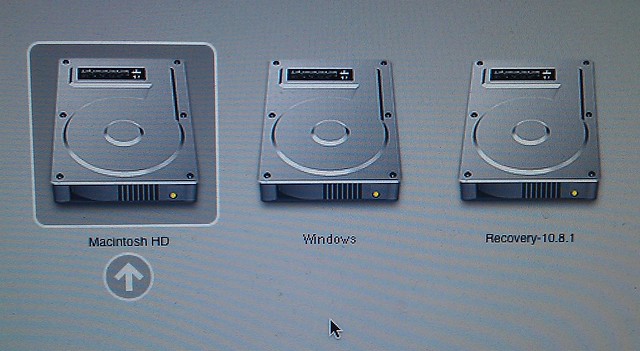
I’ve got BootCamp running on my Mac Pro, and can get the menu for OSX vs Windows… but only if I remember to hold down the Alt key while booting.

Mac boot menu

What’s the best way to get this to appear (with a timeout, preferably) automatically?

It doesn’t look like BootCamp will do it.

Two alternative boot menus appear to be

rEFIt

and rEFInd

Any recommendations, or other suggestions?

(To clarify: I want to keep OSX as the default, but I want the computer to prompt — without having to hold down the Alt key at a specific time — to visibly allow the user to override it. Like Windows does with its boot menu when you have multiple operating systems installed.)

Update: Via Twitter, one vote for rEDInd, and a bunch of unhelpful comments asking me why I’d want to boot a Mac into Windows :-/

Hacked!

It seems this blog got hacked recently. A couple of posts had the following code inserted into them:

	 
/* < ![CDATA[ */
var quicktagsL10n = {
	quickLinks: "(Quick Links)",
	wordLookup: "Enter a word to look up:",
	dictionaryLookup: "Dictionary lookup",
	lookup: "lookup",
	closeAllOpenTags: "Close all open tags",
	closeTags: "close<div style="display: none"><a href='http://buycheaplasixonline.org/' title='buy cheap lasix'>buy cheap lasix</a> tags",
	enterURL: "Enter the URL",
	enterImageURL: "Enter the URL of the image",
	enterImageDescription: "Enter a description of the image",
	fullscreen: "fullscreen",
	toggleFullscreen: "Toggle fullscreen mode"
};
try{convertEntities(quicktagsL10n);}catch(e){};
/* ]]> */
 
 
	 edToolbar() 
	 
...(post text)...
	 
	edCanvas = document.getElementById('content');

This was on WordPress 3.2.1. I’ve now updated to 3.5; hopefully this won’t recur, but it’s something to watch out for if you’re running blogs using older versions.

Chasing a BSOD

I’m trying to nail down a repeated Blue Screen Of Death on one of my PCs. It’s only happened in the past week or so, on my 3ish year old HP a6760a desktop, in both Win7 32-bit (which I’m phasing-out) and 64-bit (which I’m moving to).

The crashes seem to happen in a couple of places, but this one is typical (output of the dump file via NirSoft Blue Screen View, with a little re-arranging of its HTML output):

Dump File 122912-22417-01.dmp
Crash Time 29/12/2012 9:15:14 AM
Bug Check String NTFS_FILE_SYSTEM
Bug Check Code 0x00000024
Parameter 1 00000000`001904fb
Parameter 2 fffff880`0a707068
Parameter 3 fffff880`0a7068c0
Parameter 4 fffff880`012ea820
Caused By Driver Ntfs.sys
Caused By Address Ntfs.sys+b7820
File Description  
Product Name  
Company  
File Version  
Processor x64
Crash Address ntoskrnl.exe+7efc0
Stack Address 1  
Stack Address 2  
Stack Address 3  
Computer Name  
Full Path C:\Windows\Minidump\122912-22417-01.dmp
Processors Count 2
Major Version 15
Minor Version 7601
Dump File Size 291,720

I’ve tried ensuring all patches were in place; that didn’t help.

Then I tried rolling back using System Restore to before it was happening. That didn’t help either.

Now I’ve tried installing the latest BIOS patch, which HP does say can help with some Win7 BSODs (though not specifically what I’m getting).

So far so good, will see what happens from here.

Update 1/1/2013: Still getting crashes. Interestingly, most (possibly all) seem to occur when Chrome is running, and particularly on pages with Flash. I have removed Flash, but it seems Chrome has built-in Flash support. So… I’ve temporarily removed Chrome to see if it stops happening. (It was up to date: Version 23.0.1271.97 m).

Update 1/1/2013 10pm: Not sure that helped. I did do a full malware check using MSE, which found: OpenCandy adware — it reckoned it was in D:\Users\Daniel\Downloads\avc-free.exe — which I think is a free “Any Video Converter” product I was mucking about with recently (I don’t think it’s the one I settled on). It’s not clear to me that OpenCandy would be causing these crashes, especially as I don’t think it was even active. Have removed it anyway.

Update 2/1/2013 8pm: Well, this is entertaining. Still getting crashes, and now it’s not booting at all. In fact it’s not even getting to the BIOS startup screen. Obviously some serious hardware problem.

Update 2/1/2013 9:15pm: After trying many suggestions from the HP support web site, such as unplugging all devices and even disconnecting hard drives and removing RAM, no luck. The power goes on, the CPU and video fans spin, but no display at all, not even the customary single beep.

I’ve posted to the HP forum hoping someone there has some ideas.

news.com.au polls rigged

A news.com.au poll over whether “football” or “soccer” was a better name for the world game resulted in 2006 votes for each.

IT’S OFFICIAL. Australia is completely split down the middle on the issue of whether to call the world’s most popular sport “soccer” or “football”.

A News.com.au reader poll which has attracted 4,012 votes at the latest count reveals that exactly 2006 people voted for football, and 2006 for soccer.

What they apparently didn’t realise was that the poll was rigged. A user posted to Reddit that he had hacked the system and ensured this and other polls came out equal.

I actually wrote a program where for each option someone voted, my program would vote once for every other option, thus maintaining a deadlock.

Every now and then, they reported on poll results as if it were actual news. After emailing them alerting them to this, they are yet to retract any of their articles.

The whole saga was blogged here.

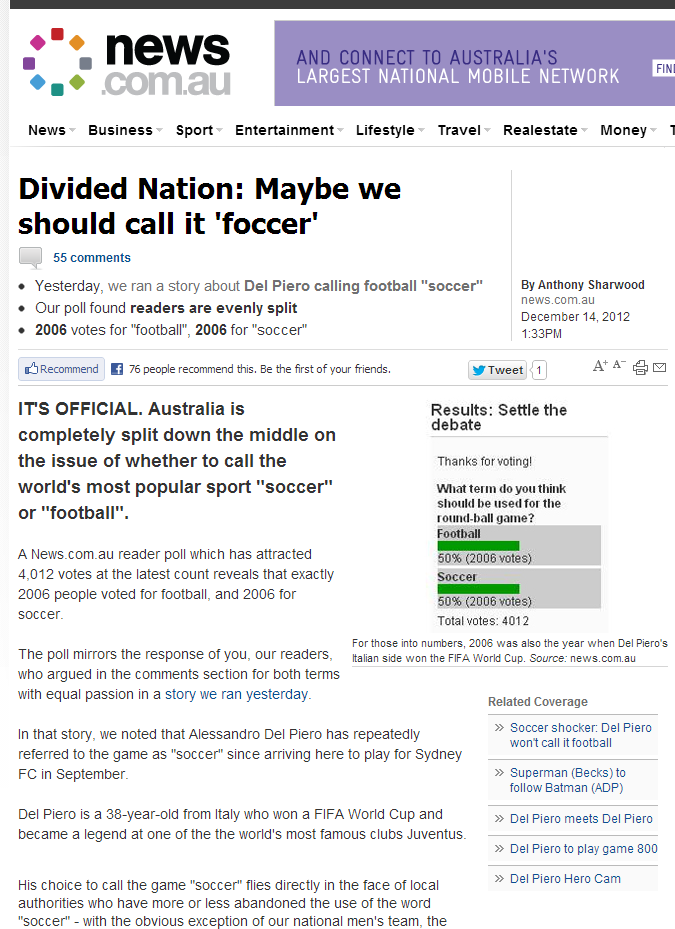
Just in case News remove the story above, here’s a screendump. — update Wednesday 8:50pm: it has now been removed.

news.com.au poll

Windows 8/Server 2012 new interface – is this progress?

Jakob Nielsen nails my concerns with Windows 8, specifically that the paradigm doesn't work on PCs:

On a regular PC, Windows 8 is Mr. Hyde: a monster that terrorizes poor office workers and strangles their productivity.

… (PCs) used to be Microsoft's core audience, and it has now thrown the old customer base under the bus by designing an operating system that removes a powerful PC's benefits in order to work better on smaller devices.

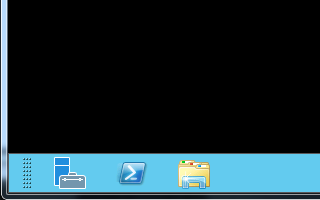
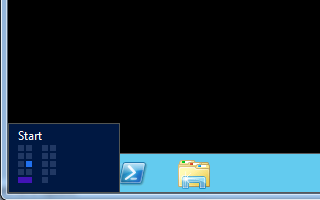
An example I'm finding trying to use Windows 2012 Server, which uses the same interface: the start menu isn't visible on the taskbar. You have to press the Windows key to get it. But this causes huge problems over Remote Desktop, which is how many servers are accessed. You have to specifically reconfigure Remote Desktop to do it, which then causes issues on your own desktop.

Windows Server 2012 - no Start button Windows Server 2012 - if you're lucky it will appear

The Start Menu does seem to appear if you mouse over the bottom left of RDP window, but I haven't yet worked out precisely what you need to do. Hover? Click? Swipe? It just seems to pop up semi-randomly. If there's a better way of doing it, it's certainly not obvious.

In my book, this is not a useability improvement.

Geeks rule the world

This warms the heart.

Here’s proof that geeks now rule the world: the USA election result shows the winner is the one with the better database. This fascinating article shows how the Obama campaign gathered and used demographic data — and how the Romney camp mis-stepped.

The Obama campaign had pulled off a trick political professionals normally fantasise about. Using some of the most sophisticated campaigning technology ever created, they reshaped the electorate to suit their candidate.

Victory for technology

Converting .ts (DVB) to other formats (in Windows)

I’m always on the lookout for a better method of converting DVB (.ts) video streams to more useable formats.

This seems to do a decent job: Free Video Converter

— just beware of the installation questions; if you accept the defaults, it’ll install an unwanted toolbar, a doubtful driver optimiser, and an unneeded (in my case) plug-in for Firefox and Chrome.

Anybody got other suggestions, including for OSX?

To use Windows "shutdown" or "psshutdown" remotely, turn off UAC

I was wrestling with trying to get shutdown or psshutdown to remotely shut down a Windows machine.

These instructions (for shutdown) seemed so straightforward: ensure the relevant service is running, that it has access through the Windows firewall, and that the calling username is aligned with one on the remote box that has permissions to shutdown.

psshutdown avoids the latter point by letting you specify the username/password.

But everything I tried returned Access Denied.

The answer, it turns out, is to switch off UAC for that user on the remote box. Then it works:

psshutdown \\tintin -u daniel

PsShutdown v2.52 - Shutdown, logoff and power manage local and remote systems
Copyright (C) 1999-2006 Mark Russinovich
Sysinternals - www.sysinternals.com

Password:
TINTIN is scheduled to power off in 00:00:20.

Of course, UAC is there for a good reason. In this case I’m not too troubled because the box involved is one I’m going to decommission in the near future, but one would hope there’s a way of making this work with UAC still enabled.

Trouble moving iTunes from PC to Mac

I tried the other day to move my iTunes library from the PC to the Mac. I figured we might as well move everyone in the house’s iTunes libraries onto OSX and then avoid having to maintain multiple copies of the iTunes software on Windows.

From reading about it, it shouldn’t be too hard.

In theory you just ensure all the files are in the iTunes folder (by ensuring iTunes is set to organise it, and running a Consolidate files operation) then copy the folder across to the new computer’s iTunes folder and open iTunes there… plus authorise/de-authorise computers as appropriate.

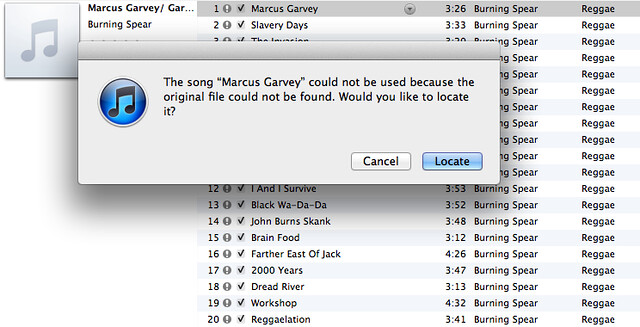
Problem was once I’d moved the files across, iTunes on the Mac couldn’t find some of them:

iTunes library error

465-odd songs. It seemed to be primarily songs within compilations. They were all there on the hard disk, just not where OSX iTunes thought they should be. (Checking back on the PC, Windows iTunes was still happy.)

It would give me the option to find individual tracks, and then claim it could try and use that info to find others, but never seemed to be able to automatically find more of them by itself.

Where it was whole albums gone missing, I ended up removing them then adding them again.

Still about 90 lost which I may have to do individually… though I’m wondering if I should just remove everything from iTunes, then drag all the iTunes folders back into it to reload them from scratch… assuming it’s okay with folders and subfolders being added.

According to email clients and anti-virus, an EXE disguised as a PDF is not suspicious?!

So seriously, why can't email clients like Outlook, as well as virus scanners, flag EXE files disguised as other things?

For instance, at work we got one the other day that was a fake Microsoft notification.

Subject: Important Changes to Microsoft Services Agreement

It basically asks you to open the attached file to see the details. The attached file is Microsoft-Services-Agreement.zip – inside that is “Microsoft Services Agreement.pdf.exe”

I scanned it with the virus scanner (with up-to-date definitions). It doesn't flag it as suspicious.

Not suspicious?! It's a frigging EXE disguised as a PDF. Windows users who have the default “Hide known extensions” on* will see it as a PDF. How is that not suspicious?

*That's a stupid default, too.