Holy moly this is impressive.
Browse the Artifacts of Geek History in Jay Walker's Library (via Matt)

Holy moly this is impressive.
Browse the Artifacts of Geek History in Jay Walker's Library (via Matt)
TinyURL went down the other day.
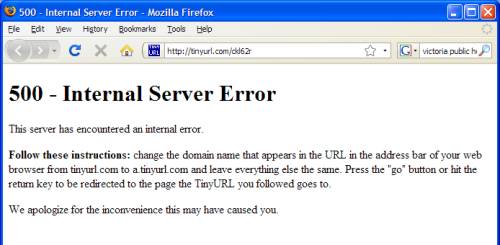
Thankfully they had a workaround (add a. to the start of the URL), but it's a reminder, especially in these days of Twitter, how much we've come to depend on it.
What happens if one day Kevin Gilbertson goes crazy and shuts it down? Or some other disaster befalls it? How many people have things recorded as TinyURLs that they couldn't get back?
Don't get me wrong, there's no reason to assume the worst. But for many it does represent a single point of failure.
I gave the Windows 7 beta a try. I've deliberately skipped Vista, as my PCs are a few years old now, and an upgrade is not a high priority at this stage.
Thankfully it happily installs into a partition of its own, leaving XP intact. Though interestingly once running it didn't seem to even see the original C: drive, but could only see the D: drive it was installed on, but as C:.
To co-exist with XP, it creates a new boot menu, where XP is the “Previous version of Windows”. Not sure how/if I'll be able to get rid of that later when I zap W7.
The installation appeared to go smoothly, but it hasn't recognised key parts of my old PC: the on-board ethernet, the video, and the sound. So apart from there being no net access, no sound, and the video resolution is screwy, it's all fine.
Of course that may all be fixed in the final version.
So I had a play around in it. The new applets (Calculator, Paint etc) are much nicer than the old versions. The whole interface looks pretty nice in fact. And with just the basics installed, it seems to run quite well on my old computer.
Please Mr Twitter, can I have the option of exact Tweet times, not all this “about X hours ago” stuff? Precision matters sometimes, and I don't want to have to think too hard to figure out if it was morning, afternoon or night that it was posted.
Please Mr Facebook, I honestly don't give a rat's arse that some of my friends have become “Fans of X”. Really don't care. I don't want to see this in the news feed. But there appears to be no way of turning it off.
WTF is wrong with iTunes? Why does it have so much trouble using a network drive as its Library? (Or it may be not so much it being on a network drive, as me daring not to put the library in My Music.)
It's continually telling me that it's lost some songs (apparently chosen at random that day, as it'll loose a few tracks off each album), or giving me an error along the lines of:
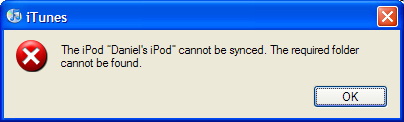
Oh, brilliant. WHICH FREAKING FOLDER ARE YOU TALKING ABOUT? At least give me a clue so I can go looking for what the problem is.
Oh yeah, the problem is actually at Apple; their Windows team just can't get this right.
Ejecting and re-connecting the iPod temporarily fixes it, but it took three or four goes of this to get the sync finished. Very annoying.
According to the AU iTunes store, for AU iTunes users, the cost to convert your existing iTunes purchases to “iTunes Plus” DRM-free 256kbps AAC is:
From the looks of it, not all music is yet available in the iTunes Plus format.
Thanks to Apple's reluctance to specifically show the iTunes software version on the download page, it's not clear to me if everyone needs to upgrade, or if recent versions can skip upgrading. (I'm running 8.0.1.11 — it appears to be sufficient?) It may also mean problems for people with moderately old (pre-OS X 10.4) Macs.
Your Google account is now an OpenID, apparently… Jeff Atwood at Stackoverflow knows what he's talking about, and reckons you just enter google.com/accounts/o8/id when asked, and it'll throw you to a Google logon screen.
Neato.
(Ah, I must have missed it when it was announced: Google and Microsoft both jumped on the OpenID bandwagon in October.)
I find it mildly amusing when the web hosting ISP reports through its system status RSS feed that the support phone line hold music has broken down.
But I suppose it shows they're serious about tech support issues.
Usually adverts on web pages don't irritate me. I know some people hate them, and use blockers to prevent them, but they don't bug me.
Except those stupid, moronic, noisy smiley adverts which some GIT has decided should use sound without asking you first. IDIOTS!
It's especially galling when you're trying to watch (and listen) to a video, so you can't even switch to mute.
To kill them (and I have), edit the “hosts” file. On Windows this is at C:\windows\system32\drivers\etc\hosts or thereabouts. Note the file has no file extension. On a Mac, this Apple support article explains how to get at it.
Put the ad servers you want to block in there, against the loopback IP address of 127.0.0.1. In Firefox you can find them by going to Tools / Page Info / Media and look for the embedded SWF files that match the irritating ads. Use a tab character between the IP address and the server name.
127.0.0.1 ad.doubleclick.net
127.0.0.1 ad.yieldmanager.net
127.0.0.1 ad.doubleclick.com
127.0.0.1 content.yieldmanager.edgesuite.net
127.0.0.1 b.casalemedia.com
Done. Stupid moronic noisy smiley ads gone.
Facebook don't really explain how to restrict some of your information to particular friends, but it's not hard to do with the new privacy settings.
1. First go to Friends, and if it doesn't already exist, make a Friends List called Limited Profile. This will be used to limit what some people can see. (You can use multiple lists to have different permissions.)
2. Put the appropriate people into it. (When confirming friends it gives you that option, too).
3. Then go into your Settings / Privacy Settings / Profile. You can customise who you want to see what, and exclude the Limited Profile people from seeing particular information — or have particular people see/not see whatever you want.
Easy.
Never mind the present day troubles with IE, how about some good ol' fashioned nostalgia?
For those remember coding on the Commodore 64 (rather than just using it), check this terrific essay from pagetable.com — to go with a forthcoming talk on the subject.
It took me back to bits of knowledge about 6502/6510 and the VIC II chip that I thought I'd forgotten, and I'll certainly be watching out for the slides.
The Game On exhibition, which recently showed in Melbourne, has recently opened in Brisbane, and new retro/indie gaming blog Just One More Game has an extensive review of it (in three parts).
State Library of Queensland: Game On!
Game On from GameOn Slq on Vimeo.