Windows browser speed test
Lifehacker has an updated set of Windows web browser speed test results: Chrome, Safari, Opera, IE and Firefox.
Seems Safari and Opera are the fastest, though they also note Firefox uses the least memory.

Lifehacker has an updated set of Windows web browser speed test results: Chrome, Safari, Opera, IE and Firefox.
Seems Safari and Opera are the fastest, though they also note Firefox uses the least memory.
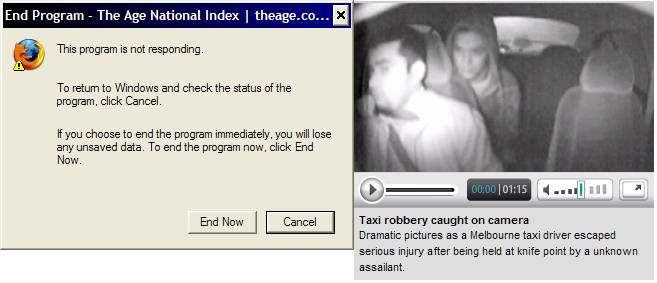
Is it just me who’s having stability problems with theage.com.au? Sometimes when I’m loading pages, it crashes the browser completely. Locks it up. It happens at home, on both my PCs, in both IE7 and Firefox on XP SP2, and appears to be linked to a video player Flash applet displayed on some pages, particularly at night and weekends when they appear not to have other content such as adverts to show.

Oddly it doesn’t occur at work, but it causes big problems at home. I’ve updated to the latest Flash plugin and that doesn’t seem to help. I haven’t found any other Flash applets that cause the issue.
I’ve put theage.com.au into IE’s Restricted Sites list. That neatly zaps the use of plugins like Flash.
There appears to be no equivalent method in Firefox. Flashblock would do the job, but is a little like a sledgehammer to crack a nut. AdBlock Plus should do better.
Of course, none of this solves the root cause. I wonder if it’s just me.
Web developers are rejoicing, as IE8 is to be standards-compliant by default.
By the way, Long Zheng has a preview of the IE8 toolbar. I like the way the domain is highlighted… I wonder if FF et al will copy that feature and get it out the door before IE8 is ready for general release?
Normally you can only get two downloads from any one site happening at a time. But it can be overridden. I know, I know, you’re not actually meant to do this, as it breaks some HTTP standard or other. But occasionally it’s warranted… umm, if you’re talking to your own web server. Yeah.
Firefox: In about:config, go to network.http.max-persistent-connections-per-server
IE 4+: Get in the registry and alter HKEY_CURRENT_USER\Software\Microsoft\Windows\CurrentVersion\Internet Settings
– MaxConnectionsPerServer for HTTP 1.1
– MaxConnectionsPer1_0Server for HTTP 1.0
Apparently you can’t change it in Safari. (Anybody know better?)
While the Windows animated cursor vulnerability is getting patched, George Ou at ZDNet has highlighted a Firefox vulnerability (known to exist, but will not be made fully public until a patch is available) and noted that while IE7 under Vista runs in Protected Mode, with reduced (read-only) access to user data, Firefox doesn’t. And there’s no shortage of Firefox vulnerabilities recently.
Of course Protected Mode is Vista-only, so those of us hanging back with Windows XP won’t see the benefits. But it does leave me wondering: is the Firefox mantra of “Safer, faster, better” still true?
Safer: Well IE7 is more secure than previous versions, and even IE6 can fairly easily be secured against most ActiveX, particularly under XP SP2. Here’s a nice wrap-up of their security features. Who is quicker to patch their vulnerabilities? Mozilla or Microsoft?
Faster: Opera has previously shown to be fastest. But IE should have a natural speed advantage, by being part of the Operating System, and loaded into memory with other applications, such as applications that use HTML Help. And doesn’t it share code with Windows Explorer as well?
Firefox on old machines is particularly concerning to me (and others). As I write this, FF has one window with two tabs open, and is claiming 81Mb of memory.
What’s more noticeable is that, with no scientific basis for claiming it, IE7 seems faster to me than FF 1.5 or 2.0. Interesting.
Better: Obviously this is a general comment. When I think back, what got me over to Firefox from IE6? Tabs — now in IE7, though I still like the “feel” of the tabs in FF better (in fact I prefer FF 1.5 to 2.0, just because I’m used to it). Popup blocker — now in IE7. Security — see above. What else? Other than a wish to help IE lose market share and sock it to the Evil Empire, I can’t think of much right now.
The FF Web Developer toolbar is great, but IE has a comparable product — admittedly though there are loads of community-written FF extensions. Indeed, Jeff Atwood highlights the very powerful web developer tools available for FF, for which IE has no equivalent.
There are still web sites (particularly on Intranets) that work in IE but are partially broken in FF. And that Firefox tooltip bug is still not fixed.
So will I switch back? Maybe not, out of inertia. And not unless Google (or someone else) does a browser sync for IE — though there’s no shortage of manual ways of getting bookmarks between IE and FF.
And of course, anybody involved in web development (as I am) should check their web sites in both (and Safari and Opera, preferably).
For everyday browsing though, IE is probably back to being as good as FF, and possibly faster. And while I really like FF, I do think it’s become less compelling to install FF on new/rebuilt machines — particularly older ones.

If I have my computer setup for my region, why would I want to override it in favour of US English, which is how IE7 defaults?

IE 7 is now available for download.
It’ll hit Windows Update in the next couple of weeks.
(via Malcolm)
PS. Friday morning: It’ll be starting to arrive via Windows Update by the start of November.
Ed Bott writes about Explorer Destroyer, a programme some Firefox fanatics have dreamed up to try and force people into dumping IE and using Firefox.
I’ll side with Ed on this. To deliberately degrade an IE user’s browsing experience is just the kind of thing FF supporters should be against.
And bear in mind that a significant number of web users aren’t in control of what browser’s on their desktop. They might be home users on a machine set up by a geek who don’t know how to change browsers… they might be corporate users who are using IE because of corporate policy… they might be in a Net cafe.
To my mind it’s just as ratty as, say, MS deciding to release some software for XP only, when there’s no technical reason it can’t run on Windows 2000. Screw the user, it’s all about market share at any cost.
As a contrast, here’s the Wordpress mob’s campaign: BrowseHappy.
I don’t normally use IE, so when I was taking a look at something in it, I suddenly noticed how many mysterious unnamed panels the status bar has.
![]()
A little tinkering identified some of them. Others remain a mystery. Left to right (this is IE6, and may differ according to what add-ons you have installed):
Maybe someone can reveal what the two blank unknown panels are for. But it strikes me as pretty silly that these are here, blank, with no clues given. No tooltips when hovering, and no response when left-clicking, left double-clicking or right-clicking. Why bother having them?
Even those that do respond shouldn’t be blank, not if the designers intend people to actually use them. Why would you bother clicking around a blank panel? Are we supposed to use our sixth sense to work out what they do?
My keyboard has a Web button on it, which as you’d expect opens up my web browser.
Like all right-minded people, I have this set up in Windows’ “Set program access and defaults” screen to go to Firefox.
But if I press the button when a Windows Explorer window is open (eg browsing a directory) it goes to IE in that window, instead. Hmmm.
Microsoft have announced they’re going to use the same RSS (feed) icon as Firefox.
Good stuff. For RSS to move into the mainstream, it needs standardisation like this. And we’ve got enough warning to start putting it on our web sites, before the great unwashed see it in IE7.
Now, if we can just figure out the myriad of formats of the feeds themselves…
22 queries. 0.960 seconds. Powered by WordPress