Category Archives: Mac

Chrome crashing in OSX – fixed by re-installing

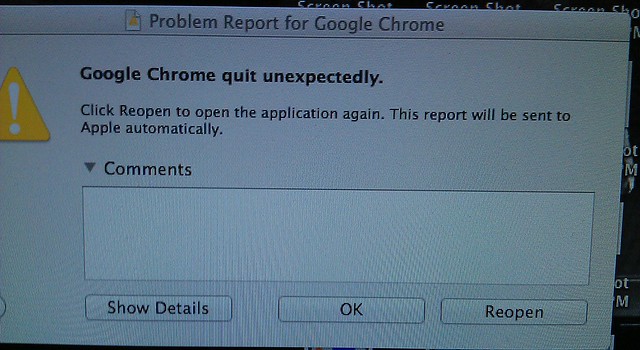
I’m no OS X expert, so I was a bit befuddled to find Google Chrome began crashing on startup a few days ago. Was it some evil Apple plot to lock Google out of the Mac?

Chrome crashing on start up in OSX

All the grisly details from the automated report are below… it’s not the most readable of reports.

The fix: What I did was to download Chrome again and re-install. That seems to have fixed it for now.

Continue reading

Setting up a used Mac Pro

Mac ProWe’ve got a used Mac coming to our house. I haven’t owned a Mac before (though I have used one a bit).

It’s a 2008 era Mac Pro, bought through my sister’s work, and the I’m told the spec is:

MacPro3,1 – 2 x Xeon 2.8 GHz (8 Core), 4GB Memory, 300GB Storage, OS 10.6

So despite being 4 years old, should be pretty quick I reckon.

It’s coming without keyboard and mouse, so I’ve gone and bought a cheap Microsoft Desktop 600 pack (corded USB keyboard and mouse) because I discovered I had not a single USB keyboard in the house. (I have an intense dislike of the feel of Apple the keyboard and mouse.)

My plan is to upgrade it to the latest OSX (A$20.99 on the Mac App Store; and Harvey Norman has a special of 2 x $20 iTunes cards for A$30 at the moment), install a new big hard drive (I’m thinking 2 terabytes — it looks like the Western Digital Caviar Blacks should be compatible with it, and cost about A$190) and use Boot Camp to get Windows 7 running on it alongside OSX.

Some more memory would be good, too.

Standby for updates and desperate pleas for advice as we figure it out and set it up.

First question – can I sign up for the Mac App store without messing up my iTunes account on another computer?

A friend on Twitter says it’s fine — it would fall into the usual 5 devices per iTunes account thing.

Video connection

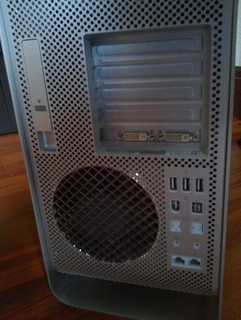
I didn’t even think of this. Only DVI connections out of this beast — my old monitors are all VGA.

It’s Sunday afternoon, so my options for an adapter were Officeworks ($30) or Dick Smith ($25). Dick Smith wins.

The beast fires up
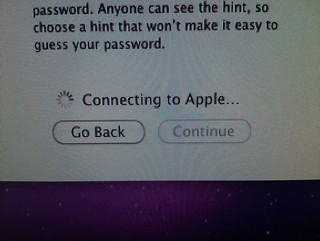
The long wait to create my Mac accountThe beast fired up and asked for my initial account information… then sat there for about 15 minutes “Connecting to Apple”. Eventually it got there.

It’s got OSX 10.6 on it… went to run Software Update, but it had a problem with the download (possible corruption) and decided it wanted to have another go. Odd.

Updating OSX

Had to update to 10.6.8 to get the Mac App Store, then with $2.25 left on my iTunes account from previously and a $20 iTunes card added, I’ve bought Mountain Lion (10.8). Almost 2 hours to download it, mind you… this had better be worth it.

It was only after buying and starting to download that I read an interesting article suggesting that actually Snow Leopard (10.6) is the ultimate in stable useable OSX versions for older Macs. D’oh. Oh well. (Some interesting other stuff on lowendmac.com as well.

After installing 10.8, I’m rather impressed that all but 10Gb still appears to be available on the disk. Very impressive. Actually it hasn’t installed… now it says it’s still downloading. Will investigate.

Slightly disappointed though that GarageBand and iMovie aren’t free anymore. $15.99 each on iTunes, won’t break the bank (especially if bought with discounted iTunes cards).

OSX 10.8 take 2
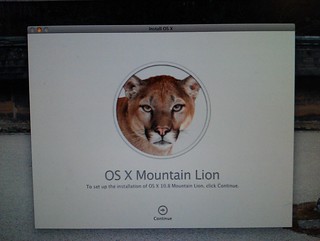
Upgrading OSX to Mountain LionOK, now it’s installed. Took a little longer than expected, but it’s very nice. Will take a little getting used to, of course. Seems quite responsive.

Startup chime

The startup chime is stupidly loud. I’ve “fixed” it by muting the internal speaker — since generally we’ll use this beast with external speakers, so having the internal one silent won’t be any loss.

There are software solutions to this, but many of them don’t work in OSX after 10.6. Apparently this one: StartNinja, should work.

Windows: Bootcamp vs Parallels

I’d intended using Bootcamp to run Windows 7, but it was suggested to me that I should check out Parallels (or VM Fusion, in Chris’s awesome set of tips below).

This article compares Parallels and Bootcamp(taking into account that Parallels has recently had a big upgrade in performance, though just in the last week or two there’s been another new version). This probably sums it up: “while Parallels is an incredible technical achievement, the Windows power user will notice a drop in performance.”

The article goes on to say that basically it depends on whether you’re primarily going to use Windows (in which case go Bootcamp) or you genuinely want to use them side-by-side (in which case Parallels may be the go).

This article compares VM Fusion and Parallels, and concludes that the former is slightly better, but it depends on your priorities.

Anti-virus

Some diehard Mac users say they don’t need anti-virus. I’m not so sure — while it seems unlikely, there are some around, and it might be better to be safe than sorry.

Sophos’s free antivirus for home sounds pretty good. Anybody tried it? Seems to get good reviews.

I hate the Mighty Mouse

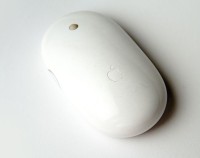
Apple Mighty MouseWe’ve got an iMac in the PTUA office which I use on the odd occasion. I’ve gradually got used to the world of MacOS, but one thing I still hate is the Mighty Mouse.

There’s something about the feel of it — the non-buttons, and the scroll wheel in particular. I hate the feel of it. It feels really uncomfortable in my right hand; it leaves my fingers tingling in a most unpleasant way. And it’s not much better in my left hand either.

I don’t recall having this kind of reaction with any other mouse. And I don’t even understand why this one feels so bad to me.

It’s odd. Anybody else had the same sensation?

(Pic credit: Wikipedia)

Thanks a lot, Apple

I was using a USB drive to move copy files from a Windows box onto a Mac.

Easy enough; plug it in, copy the files over.

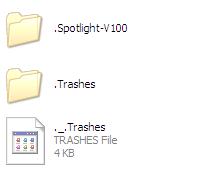
Then I plugged the drive back into a Windows computer. What do I see? Oh, delightful, MacOS added some hidden directories for Trash and Spotlight.

Apple Spotlight directories

Harumph. Annoying, but no biggy I guess.

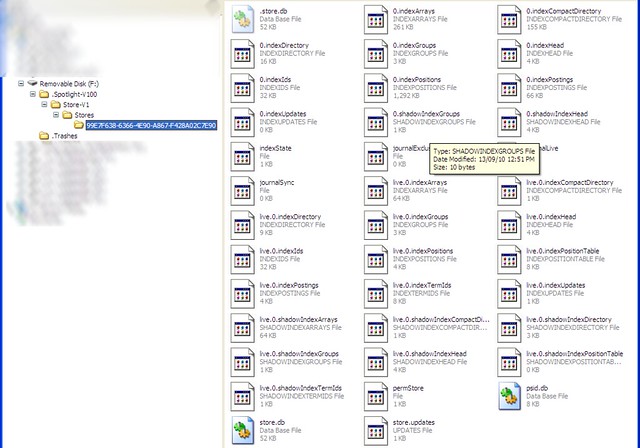
Wait a sec, what’s inside those directories? A bunch of stuff, it turns out:

How about: .Spotlight-V100 \ Store-V1 \ Stores \ [long hex string] … and inside there, about 2Mb of junk.

Apple Spotlight crap on my USB drive

Now, I could understand that if I’d copied anything from the Mac back onto the USB drive, thus it might have needed all that stuff to do the wonderful Spotlighty things in the future.

But just copying stuff off it? Why make that assumption and dump all this crap on it? Particularly hidden, so many people wouldn’t even spot it.

Oh well, it’s in keeping with the iTunes bloatware philosophy of dumping heaps of software onto your PC that most people don’t need. Ed Bott’s updated his guide to avoiding that with iTunes 10:

Apple still gives its customers a monolithic iTunes setup program with absolutely no options to pick and choose based on your specific needs.

Why is that important? When you run the iTunes setup program, it unpacks six Windows Installer packages and a master setup program, which then installs nearly 300MB of program and support files, a kernel-mode CD/DVD-burning driver, multiple system services, and a bunch of browser plugins. It configures two “helper” programs to start automatically every time you start your PC, giving you no easy way to disable them. It installs a network service that many iTunes users don’t need and that has been associated with security and reliability issues.

And you wonder why I dislike iTunes with a passion that burns like the fire of a thousand suns?

It’s a must-read if you’re installing iTunes on Windows.

Getting used to the Mac

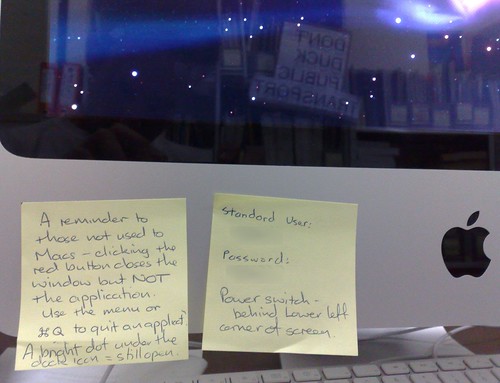
I usually use Windows, but I’ve been using Mac OSX a little bit, on a new iMac in the office of an organisation I do some work for. It’s nice, lovely design, though I think it’s pretty funny that it’s so damn streamlined that the On/Off button is hidden away at the back, so consequently there’s a PostIt note on the front of it to help people find it.

The Mac

I’ve got used to having to go to the menu to properly shut a program. I’m not really clear on why clicking the red dot on the window doesn’t do it. But that’s okay — another PostIt note reminds us Windows people of that.

So far there are two main things I can’t get used to on the Mac (apart from the lack of tactile response from the keyboard and the feel of the mouse):

Command-Tab switches applications, but not windows. I can’t figure out how to get around the various open windows of an application without using the Window menu, which is cumbersome.

Differences with navigation around a document, at least how it appears to me so far… maybe someone knows better.

PC Mac
Go to start or end of document Ctrl-Home or Ctrl-End Home or End
Go to start or end of line Home or End Command Left or Right
Go up/down a page Page Up or Page Down Page Up or Page Down
Go forward or back a word Ctrl-Right or Ctrl-Left Option-Right or Option-Left

But the thing that really keeps catching me out is that Home/End/PgUp and PgDown move you around, but don’t move the cursor. So you think you’re at the end of the document, but you start typing and it jumps to back where you were. At least, that’s what it does in Apple Mail. Very irritating; seems you have to click at the end to tell it you want to start typing at the end.

Is there a better/quicker/easier way?

Snow Leopard – Intel only

It had to happen, right? Mac OS Snow Leopard is out today. It’s the first version which doesn’t run on PowerPC Macs.

“Snow Leopard is an upgrade for Leopard users and requires a Mac with an Intel processor.” — Apple Store

I suppose it’s been about three years since Apple stopped selling PowerPCs. I wonder how many 3rd party software vendors are also abandoning them. I know my sister has a PowerPC Mac laptop from circa 2004, but I wonder how many others are still out there in regular use. Perhaps the more significant issue will be how long patches for newly discovered vulnerabilities will be supplied.

Perhaps it’s no biggie, but I’m just imagining the fuss that would be made if Microsoft made a new operating system that didn’t work with four-year-old PCs.

Windows users: Stop buying Apple products

Funny: Danny Katz’s hilarious call for Mac users to rise up and rebel at the legions of Windows users buying iPods and iPhones.

But then in 2002 along came the Apple iPod and oh, how quickly did their attitudes shift? Suddenly PC people all wanted to strap an iPod to their jogging arm AS IF THEY WERE ONE OF US. Then in 2007, along came the Apple iPhone and ah, how quickly did their Mac contempt wane? Now they all wanted an iPhone to flash around among their doofy mates AS IF THEY WERE BORN OF OUR ILK.

Read the rest

The button

The non-profit I volunteer for got an iMac in the office. So lovely. Such clean design, spoilt only by the Post-It note someone had to put on the front of it to tell people to reach around the back to find the power button.

It just works

I was very amused over the weekend to give an MPEG2 file on a USB drive to a couple of Mac addicts and watch them try to play it on their Macbooks. They were able to get the file off the drive with no problems, but Quicktime wouldn't recognise it.

One of

http://capturehislove.com/ Capture His Heart

them ended up resorting to VLC, and it played… badly out of sync.

heh. Yeah. “It just works.”

Mind you, MPEG2 playback in Windows Media Player is choppy on one of my PCs, so I guess I can't crow too much.

zp8497586rq

Merry Christmas from Apple

My sister is fuming because she got an iPod Nano for Christmas, and apparently it won't work with her 3 year old PowerPC MacBook, which runs MacOSX 10.3. Sure enough, the Nano specs say it needs 10.4.8 or higher. She's got no real interest in paying and installing for an OS upgrade to get around the problem, so she'll ask a friend to load her iPod for her.

Basically it means that Apple is saying you can't have a new

iPod if you run a version of OSX from before April 2005 (with the appropriate free updates).

Whereas it does run happily on Windows XP (SP2) or Windows Vista. So you need to have a version of Windows from no earlier than before October 2001 (with the appropriate free updates).

How does Apple get away with treating its customers like that?

zp8497586rq

Throwing backwards compatibility away

If I had name the biggest difference between the attitudes at Microsoft vs Apple as to how they build their operating systems, it’s that one of Microsoft’s primary concerns is backwards compatibility, whereas Apple isn’t afraid to jump off the cliff to a better place, knowing it can’t go back.

A lot of what is going on underneath the hood of Windows involves shims, workarounds, and downright kludges to allow old apps and a gazillion third-party devices to work. From a purist’s point of view, it’s got to be ugly.Ed Bott

You wouldn’t see Microsoft making a jump across processor lines like Apple did to Intel, saying a (prolonged but firm) bye-bye to anybody who bought a Mac before this year. Microsoft would get crucified for such behaviour.

But now that Microsoft has mature, stable (and free) virtualisation technology, maybe they can make a leap. What’s to stop them totally re-engineering Windows to remove all the messy stuff (some of which dates right back to the early versions of DOS) and telling anybody who wants to run an old application that they’ll have to do so on a virtual machine?

(From an idea out of a discussion with Matt.)

No more security through obscurity

Feel safe using Firefox and/or Mac OS X? Don’t. This article discusses recent research showing both are subject to a number of vulnerabilities. Not as many as poor ol’ Windows users using IE, but still enough that it’s wise to be wary.

Not to mention the issues in the various media players.