
How to embed a Word document (or other file) in another Word document
Sometimes it makes sense to embed one Microsoft Word document in another, rather than include a link to it, or paste the contents in. This is especially useful when sending multiple documents to people who can’t access your shared files. (Though only, of course, in environments where you can be sure everybody has Microsoft Word. If that’s not assured, you should be using something more universal, such as PDF.)
For some reason Word makes it quite tricky to do, its interface preferring to send you down the path of taking the contents of your second document and pasting them into the first.
The easiest way I’ve found:
- Find your second file (the one to be embedded) in Windows Explorer. Copy it (Ctrl-C)
- Go to the spot in the document you want to embed it in
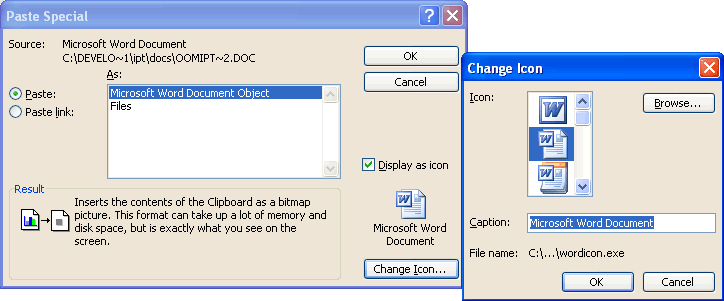
- On the menu: Edit, Paste special, paste as Word document (or as file), then turn on Display as icon. (Ignore the gibberish where it claims to be pasting as a bitmap picture.) (Note in the screen grab below how short filenames live on in WinXP/Word 2003, ten years after long filenames were introduced into Windows)
- Click Change icon
- Change the caption to something meaningful, as Word’s default behaviour is to give it the incredibly useless caption “Microsoft Word Document”
- If you want you can change the icon, though unless you’re deliberately trying to confuse people, the default is probably fine.
- OK, OK. It should be done. Test by double-clicking on the icon
Microsoft today started previewing the next version of Office. Ten bucks says it won’t make this process any easier than it is now.
Brilliant – been searching all over for this. Microsoft continue to make great features hard to find !
Only solves a small part of the problem (thank you for that). Only displays an icon in the document, not the text. How does one see the entire document containing the embedded sections (that were pulled from other files, for example, a proposal with several sections, each one written and saved separately)? All I see in the “master document” are these icons. I tried different View modes and settings but none seem to expand the embedded sections into anything readable/usable.
Thank you very much, this was extreamly helpful!
It got worked….good solution!
thanks a lot…
Thank god for people like you, I have been trying for the last 6 hours to attach my CV to an application form, as a file, however every time I tried my full C.V was emerging on the online application. Thanks Daniel, your hard work has made my life much easier.
Great – thank you. Why are these things so hard to find??
Thankyou heaps
You can do the same via Insert->Object->Create From File Tab->Browse and select the file
– Select “Link to File” if you want a Link to appear at the place of insertion.
– Select “Display as Icon” if you want an icon to appear at the place of insertion”
Standard Icons will be displayed for most recongnized file types.
Hit OK.
This is a very nice tip.. I have searched many places..
Awesome!!! Thanks a bunch…
Klasse, das ist hilfreich!
Thank you so much – so helpful, much more so than Microsoft help..
Brilliant. Thanks. I am usually really bad at this kind of thing and you made it simple.
Thanks very much, workded like a charm
Great info. I’ve searched for this information for so long. Thank your very much.
Awesome site. I found what I was looking for to show me how to embed a word document into another word.
Thank you
I was able to do this easily by sending me the file I wanted to insert. Once received, I copy it from the email, and paste it in the master doc.
I am not sure why it works this way, but it worked for me.
Good luck everybody.
Thank you, thank you thank you! you save my butt from looking like a loser in front of my boss!
Many thanks. I had been struggling to do it by trial and error within MS Word, but after Googling the problem I found your website and within minutes was sorted. Many thanks.
Thanx a lottt!!!!!!
What if the pasted document is updated, will it automatically update where it is pasted into?
@MR Anon, my assumption is no, because you are pasting in a copy of the document, not a link to the original.
This was really helpful to me
Thanks you very much
I tried this tip, However i am getting some other icon instead of PDF or Word Icon.
Can you please assist me how can i change the display icon, Displayed icon is some standard system style.
Gagan
@Gagan, at step 7, click Browse from the Change Icon dialog. I think you can use a .ico (Icon file) or .exe (an EXE with embedded icons).
Can someone answer Phil’s question?…
Only solves a small part of the problem (thank you for that). Only displays an icon in the document, not the text. How does one see the entire document containing the embedded sections (that were pulled from other files, for example, a proposal with several sections, each one written and saved separately)? All I see in the “master document” are these icons. I tried different View modes and settings but none seem to expand the embedded sections into anything readable/usable.
I have the same question. I need to be able to embed the formatted document into another Word document in such a way that when the embedded file gets updated in its original spot, the other Word document will automatically be updated. Thanks.
I’d also like an answer to Phil’s and srhamm’s question.
I would like to maintain user instructions in small .mht files, so they can easily navigate through the instructions on internet explorer.
But I’d also like a printable version of the instructions, so I want one document with all these chunks of information in it.
If I update something, I’d like to have it updated in the printable version automatically.
Hope that that is possible.
Thanks!!!!!!! I got it 🙂
GREAT, IT WORKS FOR ME.THANK YOU
Thaks a lot, perfect.
Oh god thank you – this was driving me insane
Thanks man. Great help!!!
I tried many a co-worker but no one knew how to do it. Thank you your instructions where easy to follow and ever so quick – well done.
How do you link in parts of another document and then display it!
I don’t want an icon!
I want to see the text from another document embedded with a dynamic update to the sections from another document (ie one is the master document that changes)
I need to do this for an assignment, and need to submit it with both documents in a single file with continuous flow. How is that done?
Thanks – this was so helpful.
Thanks for this tip – searched high and low for how to do it in Word2010… Even the Microsoft help was wishy-washy!
Particularly tickled by your reference: ‘Ignore the gibberish where it claims to be pasting as a bitmap picture’
That sums up their dialogues, ‘jibberish’
Much thanks
Awesome!
Excellent …….working fine…..hands up
May God bless u and give u more knwld…..
so thanksssssss
What a clever thing. Thank you very much
Clear simple instructions. Worked frist attempt and saved me much time & frustration.
Thank you.
Cheers Geek
Fantastic – so easy to do, thanks so much!
When I try to insert a word into word 2010 by doing the following:
Insert->Object->Create From File Tab->Browse and select the file
– Select “Link to File” if you want a Link to appear at the place of insertion.
– Select “Display as Icon” if you want an icon to appear at the place of insertion”
My Word program stops working. It works to embed an xcel doc or a pdf but not a word document. Does anyone have a fix?
Thank you so much…….
To add JUST the text (not an icon or link), you can go to the Insert tab, and in the Text section click Object, then Create from File tab, browse for your document, hit OK and the text should pop up. My only problem is that it goes off the page and doesn’t fit. To solve this, I made my second word file into a .pdf and it worked perfectly except it only inserts the first page of the .pdf. You’ll have to make each page a .pdf and insert each page separately. 🙁 If someone knows a way around this, please share! Also, since it’s a .pdf, you won’t be able to edit the text if you need to unless you re-save the doc into a new .pdf. You could double click on the inserted .pdf page to edit that way too.
GOOD LUCK!
ANSWER TO PHIL’S QUESTION
Highlight the object(s) and right click. You may get errors, if so just select OK until they stop. You will get a mini menu, select Document Object>Open
It should display you object, then save under another name.
Hope this helps!
Hallelujah! A geek who speaks perfect English. Thank you, this was incredibly simple. x